
NIT Warangal Recruitment 2026, 12th, ITI, Diploma, Graduate
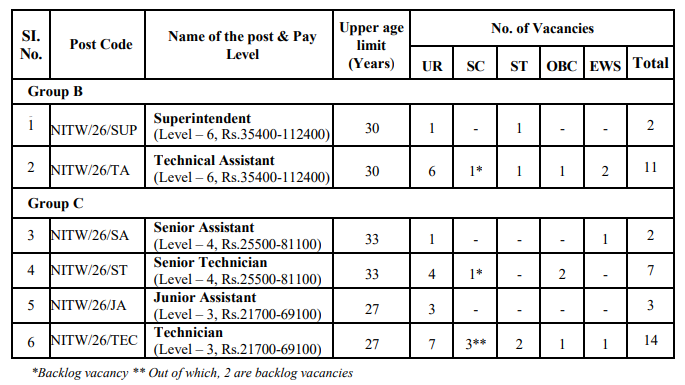
NIT Warangal Recruitment 2026: NIT Warangal invite application for the post of Superintendent, Technical Assistant, Senior Assistant, Serior Assistant, Senior Technician, Junior Assistant, Technician Posts. 12th, ITI, Diplima, Graduate candidates are eligible to apply NIT Warangal Recruitment 2026. NIT Warangal Recruitment 2026 Online apply begin from 09-01-2026. NIT Warangal Recruitment 2026 application closed on 08-02-2026. Interested and eligible candidates apply before last date and also read full notification of NIT Warangal Recruitment 2026.

| Application Start Date | 09-01-2026 |
| Application Last Date | 08-02-2026 |
| Application Mode | Online |
| Important Updates | Click Here |
NIT Warangal Recruitment 2026
NIT Warangal Recruitment Qualification 2026
| Posts | Educational qualifications |
| Superintendent | Bachelor’s Degree |
| Technical Assistant | Diploma/B.E. / B.Tech/MCA |
| Senior Assistant | 12th |
| Senior Technician | 12th/ITI/ Diploma |
| Junior Assistant | 12th |
| Technician | 12th/ITI/ Diploma |
NIT Warangal Recruitment 2026 Age Limit
| Minimum Age | 18 Years |
| Maximum Age | 27-33 Years as per posts |
Age-relaxation permissible beyond upper age limit
- 01 SC/ST 5 years
- 02 OBC 3 years
- 03 PwBD (Irrespective of the fact that the post is reserved for PwD or not) 10 years
- 04 PwBD (if OBC post is reserved)) 13 years
- 05 PwBD (if SC/ST post is reserved)) 15 years
NIT Warangal Recruitment Selection Process 2026
- The scheme/pattern and indicative syllabus of the selection process for the posts, will be notified separately in due course of time.
- Candidates may take note that the 1 st Stage of Selection Process, i.e., CBT shall be conducted at Hyderabad, Mumbai, Delhi and Kolkata Centres.
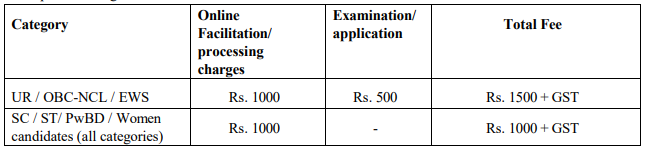
NIT Warangal Recruitment 2026 Application Fee
How to apply NIT Warangal Recruitment 2026
- Candidates to go to the NITW website (https://nitw.ac.in/staffrecruit) and under Advt. No. 01/2026, click on the option “APPLY ONLINE” which will open a new screen.
- To register application, choose the tab “Click here for New Registration” and enter Name, Contact details and Email-id. A Provisional Registration Number and Password will be generated by the system and displayed on the screen. Candidate should note down the Provisional Registration Number and Password. An Email & SMS indicating the Provisional Registration number and Password will also be sent.
- In case the candidate is unable to complete the application form in one go, he / she can save the data already entered by choosing “SAVE AND NEXT” tab. Prior to submission of the online application candidates are advised to use the “SAVE AND NEXT” facility to verify the details in the online application form and modify the same if required. Visually Impaired candidates should fill the application form carefully and verify/ get the details verified to ensure that the same are correct prior to final submission.
- Candidates are advised to carefully fill and verify the details filled in the online application themselves as no change will be possible/ entertained after clicking the COMPLETE REGISTRATION BUTTON.
- The Name of the candidate or his /her Father/ Husband etc. should be spelt correctly in the application as it appears in the SSC Certificates/ Mark sheets/Identity proof. Any change/alteration found may disqualify the candidature.
- Validate your details and Save your application by clicking the ‘Validate your details’ and ‘Save & Next’ button.
- Candidates can proceed to upload Photo & Signature as per the specifications given in the Guidelines for Scanning and Upload of Photograph and Signature.
- Candidates can proceed to fill other details of the Application Form