
MPGCL Plant Assistant Answer key 2026
MPPGCL (Madhya Pradesh Power Generating Company Limited) ने Plant Assistant (PA) पद की Answer Key 2026 जारी कर दी है। Advt. No. 5560 के अंतर्गत आयोजित परीक्षा की Answer Key Official Portal chayan.mponline.gov.in पर उपलब्ध है। जिन Candidates को किसी Answer पर Objection करना है वे Application Number और Date of Birth से Login करके Objection Submit कर सकते हैं। Objection करने की Last Date 09 March 2026 है — आज ही Portal पर जाएं।

⚡ MP Power | MPPGCL
MPPGCL Plant Assistant (PA) Answer Key 2026 — जारी!
Madhya Pradesh Power Generating Company Limited | Advt. No. 5560 | Dated: 27/11/2025 | Jabalpur
✅ Answer Key OUT
📋 Objection Window Open
Post: Plant Assistant (PA)
🔴 Objection Last Date: 09 March 2026 | आज ही करें! — Official Portal: chayan.mponline.gov.in
📥 Answer Key Download & Objection कैसे करें?
1
नीचे दिए Official Answer Key & Objection Link पर Click करें
2
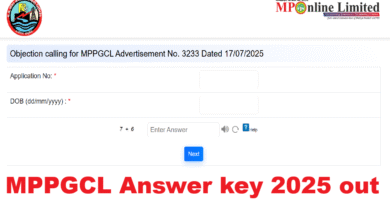
अपना Application Number और Date of Birth (DD/MM/YYYY) Enter करें
3
Captcha (दो Numbers का Sum) Fill करें और Login करें
4
Answer Key Download करें — अपने Answers से Compare करें
5
कोई गलत Answer दिखे तो Question Number और सही Answer के साथ Objection Submit करें — Proof/Reference जरूर दें
ℹ️ Important Information
📌 Answer Key Details
- Organization: MPPGCL (MP Power Generating Co.)
- Post: Plant Assistant (PA)
- Advt. No.: 5560, Dated 27/11/2025
- Headquarters: Jabalpur, Madhya Pradesh
- Answer Key Portal: chayan.mponline.gov.in
- Login: Application No. + DOB से
⚠️ Objection करते समय ध्यान दें
- Objection के साथ Valid Proof / Reference जरूर दें (Book Name, Page No., etc.)
- बिना Proof के Objection Reject हो सकता है
- Objection Window का Last Date निकलने से पहले Submit करें
- एक Question पर एक ही Objection मान्य होगी
- Final Answer Key बाद में जारी होगी — उसी से Result बनेगा
🔴 Objection Last Date: 09 March 2026 (आज!): Objection Window आज बंद हो रही है — अभी तुरंत Portal पर जाएं और Objection Submit करें। Deadline के बाद कोई Objection Accept नहीं होगा!
📌 Answer Key से अपना Estimated Score Calculate करें — सही Answer पर +Marks, गलत पर Negative Marking (अगर लागू है) देखें।
📌 Objection Submit करने के बाद Confirmation Save करें — Screenshot ले लें।
📌 Final Answer Key और Result की Update सबसे पहले पाने के लिए — Telegram Join करें: @anilsiriti
📌 Objection Submit करने के बाद Confirmation Save करें — Screenshot ले लें।
📌 Final Answer Key और Result की Update सबसे पहले पाने के लिए — Telegram Join करें: @anilsiriti